What makes an appointment setting script work?
Scripts fail in two ways: they try to sell on a call whose only job is to book, or they ignore the lead's actual situation. The fix is a fixed structure with a flexible middle.
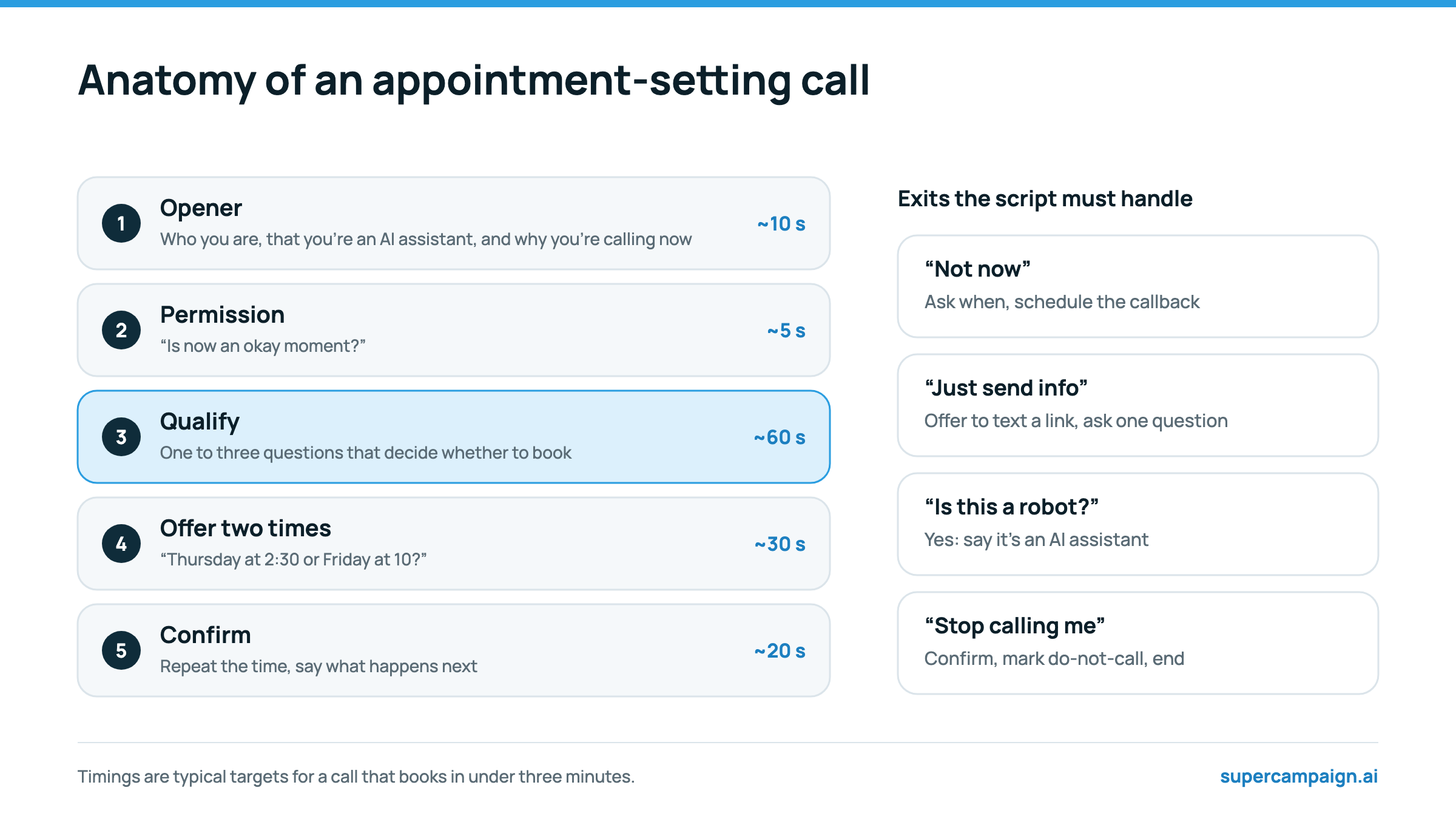
- Opener: who you are, the company, that you are an AI assistant if you are, and the specific thing the lead did.
- Permission: one question that lets them say now is bad, which keeps the call polite and the opt-out rate down.
- Qualify: one to three questions that decide whether to book, and nothing more. Discovery belongs to the meeting.
- Offer two times: specific, near-term, and checked against the live calendar.
- Confirm: repeat the time, say what happens next, and end the call.
Which script you use depends on where the lead is in the funnel.
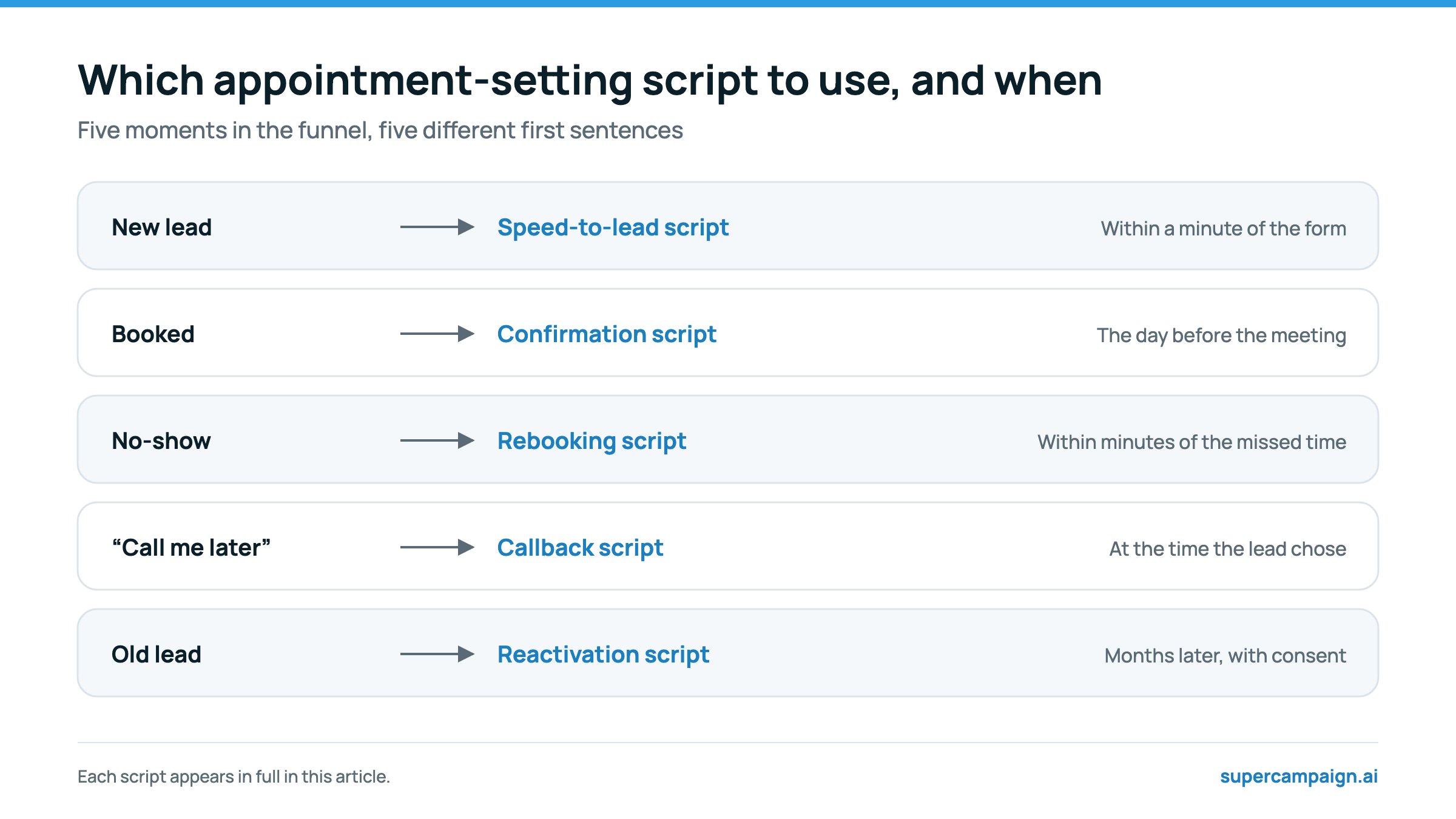
Script 1: Calling a new lead within a minute
The highest-converting call you will make. The lead has just asked for something, so lead with it.
Hi, this is Riley, an AI assistant calling from Northstar Solar. You just asked for a quote on our website. Is now an okay moment for two quick questions so we can get you the right time with one of our advisers?
If they say yes, move straight to qualifying. If they say it is a bad time, go to Script 4.
Script 2: Qualifying questions
Ask only what decides whether the meeting is worth booking. Three examples by industry:
| Industry | Question 1 | Question 2 | Question 3 |
|---|---|---|---|
| Solar | Do you own the home? | Roughly what is your monthly electric bill? | Is the roof less than about 15 years old? |
| Coaching | What does the business make a month today? | What is the main thing you want to fix? | If it's a fit, are you ready to start in the next month? |
| Real estate | Are you buying, selling, or both? | When are you hoping to move? | Have you spoken to a lender yet? |
That's really helpful, thank you. Based on that, a 20-minute call with Marcus makes sense. He'll look at your numbers and tell you honestly whether it's worth going further.
If the answers say the lead is not a fit, thank them and end politely without offering a time. Booking a poor fit only creates a no-show or a wasted meeting.
Script 3: Offering two times
Two specific options close faster than an open question, and checking the calendar first means you never offer a time that is taken.
Marcus has Thursday at 2:30 or Friday at 10 open, your time. Which works better? … Great, you're booked for Friday at 10. You'll get a calendar invite in a minute and a text the day before. Is the email we have the best one for the invite?
If neither time works, ask which day is best and offer the two nearest open times on that day.
Script 4: When the lead says “not now”
“Not now” is usually about the moment, not the offer. Turn it into a time.
No problem at all. When would be a better time for a two-minute call, later today or tomorrow? … Perfect, I'll call you tomorrow at 4. Speak then.
Then actually call at that time. An AI setter that captures the requested time and calls back then, as SuperCampaign's agent does, keeps this promise without anyone remembering it.
Script 5: Handling the common objections
| They say | You say |
|---|---|
| “Just send me some information.” | “Happy to. I'll text you a link now. So I send the right thing, can I ask one quick question?” |
| “How much does it cost?” | “It depends on [the variable], which is exactly what the call with Marcus works out. Most people find 20 minutes is enough to get a real number.” |
| “Is this a robot?” | “I'm an AI assistant for Northstar, yes. I can get you booked with Marcus, who's very much a person. Want me to find a time?” |
| “I'm already talking to someone else.” | “That makes sense. A second opinion takes 20 minutes and costs nothing. Would that be useful?” |
| “Stop calling me.” | “Of course. I'll make sure nobody calls you again. Sorry for the interruption, and have a good day.” |
The last one is not an objection to handle. It is a request to honour, immediately and permanently. In SuperCampaign, the agent's request is recorded and the contact is marked do-not-call before the workflow continues.
Script 6: The confirmation call before the meeting
Short, warm and easy to reschedule. Most of these calls last under a minute.
Hi, it's Riley, the AI assistant from Northstar. Just confirming your call with Marcus tomorrow at 2:30. Does that still work for you? … Great, he's looking forward to it. You'll get the link in a text an hour before.
If they cannot make it, offer two new times and book one on the call. Confirmation calls are one of the tactics in How to reduce no-shows for sales calls.
Script 7: Rebooking a no-show
Call within minutes, and never make them feel bad about it.
Hi, it's Riley from Northstar. Looks like today's call with Marcus didn't happen. These things come up. Would tomorrow at the same time work, or is later in the week better?
Script 8: Voicemail and the follow-up text
Keep voicemails under 20 seconds, give one reason to call back, and follow with a text that does the work.
Hi, it's Riley, the AI assistant from Northstar Solar, following up on the quote you asked for. I'll send you a text with a link to pick a time. Talk soon.
Hi {{contact.firstName}}, Riley from Northstar Solar here. Sorry I missed you. Pick a time for your quote call here: [booking link]. Reply STOP to opt out.
Merge fields such as {{contact.firstName}} are filled in automatically in SuperCampaign's texts and emails.
How to turn a script into an AI agent prompt
An AI voice agent does not read a script word for word. It follows a prompt that describes its role, its goal, the steps to take and the rules to keep, and it uses tools to check the calendar and book. Here is the new-lead script above, rewritten as a prompt.
You are Riley, an AI assistant calling on behalf of Northstar Solar. The person you are calling asked for a solar quote on our website a few minutes ago. Goal: book a 20-minute quote call with an adviser, but only for homeowners whose roof and bill make solar worthwhile. Steps: 1. Say who you are, that you are an AI assistant, and that you are calling about the quote they asked for. Ask if now is an okay moment. 2. Ask, one at a time: do they own the home, roughly what is the monthly electric bill, and is the roof less than about 15 years old. 3. If they own the home and the bill is over $100 a month, check the calendar, offer two open times, and book the one they choose. 4. If they do not qualify, thank them, say an adviser will email some information, and end the call. 5. If now is a bad time, ask when to call back and confirm that time. Rules: - One question at a time. Keep the call under three minutes. - Never offer a time you have not checked on the calendar. - If they ask whether you are a person, say you are an AI assistant. - If they ask not to be called again, confirm it politely and end the call. - Never discuss price beyond saying the adviser will give an exact figure.
In SuperCampaign, you write this in the agent studio, attach the calendar tools for Calendly, Google Calendar or iClosed, and the agent books on the call.
Mistakes that make scripts fail
- Opening with “How are you today?” instead of the reason for the call.
- Asking six qualifying questions. Every extra question loses people.
- Asking “When works for you?” instead of offering two times.
- Pitching on a booking call. The meeting is where the selling happens.
- An AI agent that hides what it is. Say it in the first sentence.
- No plan for “stop”. Every script needs a clean, respectful way out.
In the United States, marketing calls placed with an AI voice need the person's prior express written consent, and must identify your business at the start. See Is AI cold calling legal? This is not legal advice.
Sources
Reviewed on 19 October 2026. Vendor figures are the vendor's own and have not been independently audited.