What does the appointment-setting funnel look like?
Every lead passes through the same stages: it arrives, someone reaches it, a meeting is booked, the meeting is held, and some meetings turn into customers. Each stage has a rate, and the rates multiply.
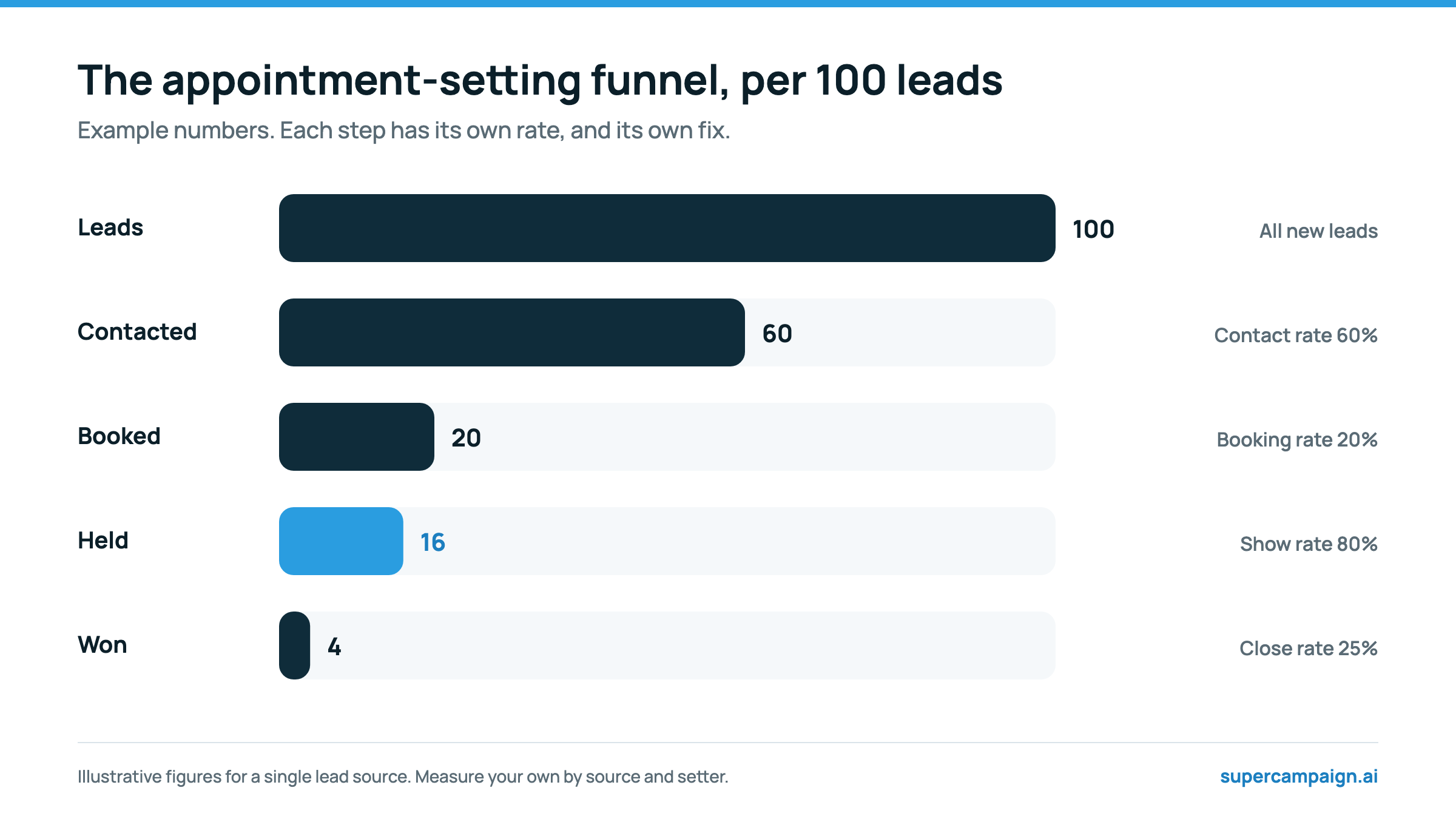
Because the rates multiply, a small gain early in the funnel compounds. In the example, raising the contact rate from 60% to 70% adds nearly three held meetings per 100 leads without changing anything else.
Which appointment setting metrics should you track?
1. Speed to lead
Median time from enquiry to the first call attempt. It drives everything below it: in the Lead Response Management study, the odds of qualifying a lead fell 21-fold between a 5-minute and a 30-minute response. Use the median, not the average, so a few weekend leads do not distort it. Target: under five minutes, ideally under one, inside calling hours.
2. Contact rate
Leads reached in a real conversation, divided by leads received. It tells you whether your timing and persistence are working. In Velocify's research, only 48% of the leads that eventually converted were reached on the first call, and 93% by the sixth, so a team making one attempt is leaving most of its contacts on the table.
3. Booking rate
Meetings booked divided by leads received. Measure it against all leads rather than contacted leads so it reflects the whole setter process. A low booking rate with a healthy contact rate points to the script, the qualification rules or the way times are offered.
4. Show rate
Meetings held divided by meetings booked. It is where most hidden waste sits. Published B2B datasets put no-shows at about 6.5% across 6,428 meetings in one benchmark, but as high as 18.1% in some industries. Show rate falls as the gap between booking and meeting grows.
5. Held meetings per 100 leads
Contact rate × booking rate (as a share of contacted leads) × show rate, or simply held meetings divided by leads, times 100. If you track one number, track this one. It cannot be gamed by booking anyone who picks up, because those meetings do not get held.
6. Cost per held meeting
Total cost of setting, meaning pay, software, call minutes and lead spend if you include it, divided by meetings held. It is the fair way to compare a human setter, an agency and an AI setter. Example: an AI setter using 2,000 call minutes a month at roughly $0.10 to $0.14 a minute costs about $190 to $290 in provider fees; if that produces 60 held meetings, the setting cost is about $3 to $5 per held meeting, before the time someone spends on scripts and review.
7. Opt-out and complaint rate
People who ask not to be contacted, divided by leads contacted. It is your early warning that a list is too cold, a script is too pushy, or calls are going out at the wrong times. If more people ask you to stop than book a meeting, pause and find out why.
8. Close rate of held meetings
Deals won divided by meetings held, by lead source and by setter. It is the quality check on everything above: a setter with a high booking rate and a low close rate is booking people who were never a fit.
Which appointment setting metrics should you ignore?
- Dials per day. It rewards calling the same unreachable leads repeatedly, and it says nothing about meetings.
- Talk time. Long calls are often bad calls; a good booking call takes under three minutes.
- Meetings booked on its own. Without show rate and close rate, it rewards booking people who will not turn up.
Activity metrics are useful for diagnosing a problem, for example a rep whose contact rate collapsed because they stopped making second attempts, but not for judging performance.
What are good benchmarks for appointment setting?
Published benchmarks vary widely by industry and lead source, so treat these as reference points, and compare yourself mainly with your own last quarter.
| Metric | Reference point | Source |
|---|---|---|
| Speed to lead | Under 5 minutes; 21-fold drop in qualification odds from 5 to 30 minutes | Lead Response Management study |
| Typical company response | 63.5% of 1,000 B2B SaaS companies never replied to a demo request | RevenueHero, 2024 |
| Call attempts | 93% of converted leads reached by the sixth attempt | Velocify, 2013 |
| No-show rate | 6.5% overall across 6,428 meetings; up to 18.1% by industry | RevenueHero, 2024 |
Which metric points to which fix?
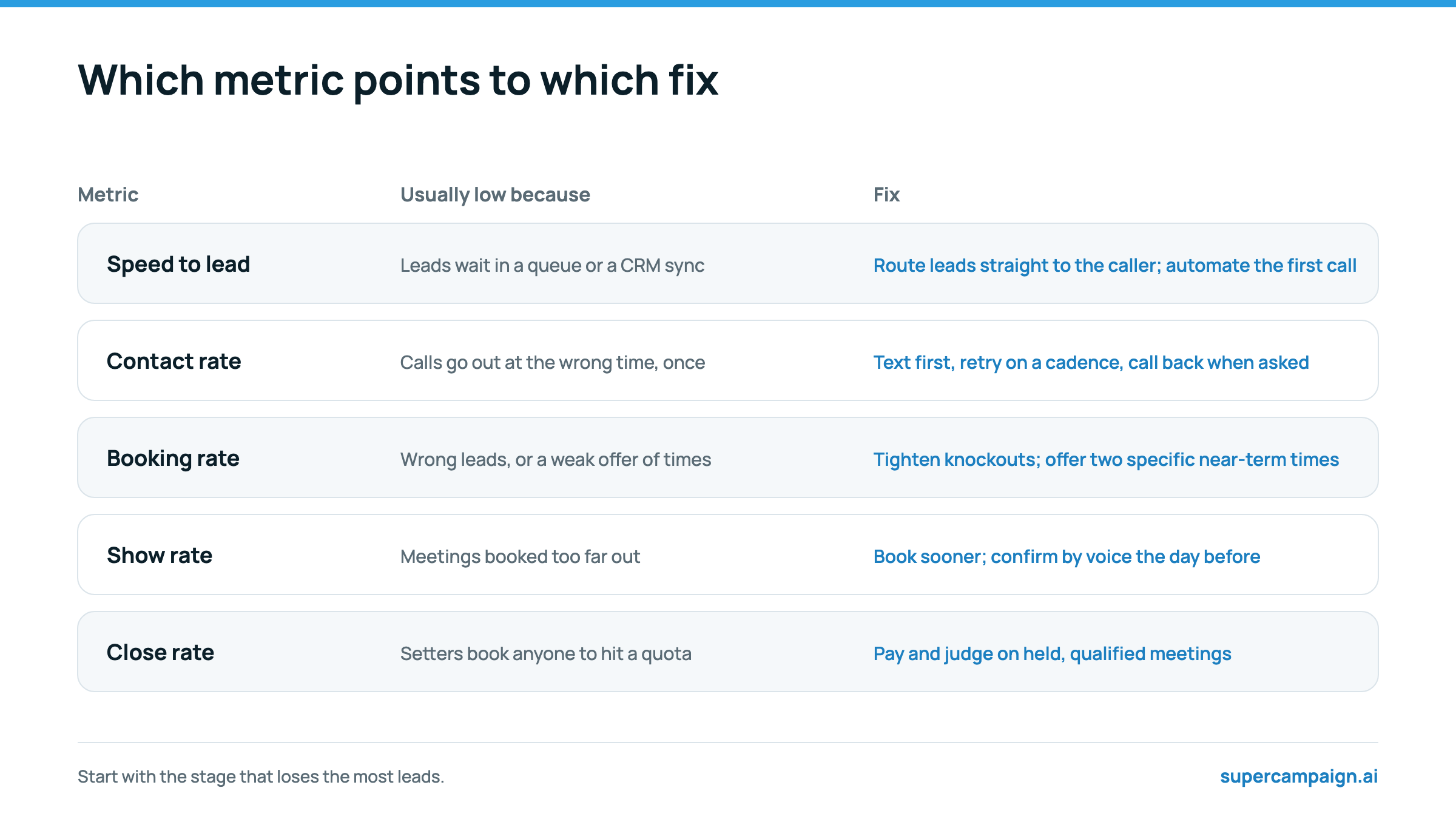
Find the biggest drop in your funnel and fix that first. Improving show rate from 70% to 80% is usually easier, and worth more, than squeezing another point out of an already decent booking rate.
- Slow speed to lead: see What is speed to lead?
- Low contact rate: see the best time to call leads
- Low booking rate: see lead qualification questions and appointment setting scripts
- Low show rate: see how to reduce no-shows
A worked example: diagnosing two lead sources
Blended numbers hide problems. Here is an illustrative month for a team with two lead sources, each sending 200 leads.
| Metric | Website form | Paid social lead form |
|---|---|---|
| Median speed to lead | 3 minutes | 4 hours |
| Contact rate | 65% | 35% |
| Booking rate | 22% | 9% |
| Show rate | 85% | 60% |
| Held meetings per 100 leads | 19 | 5 |
Blended, this team holds 12 meetings per 100 leads and looks average. Split by source, the problem is obvious: paid social leads wait four hours for a call, by which time most have forgotten the ad, and those who book often do not show. The fix is not a new script. It is calling paid social leads within a minute, naming the ad they responded to, and confirming their meetings the day before. Speed to lead and show rate point to the fix; booking rate alone would have sent the team to rewrite the script.
How to compare AI and human setters on the same metrics
Run both on the same lead sources over the same weeks, ideally alternating leads by day, and compare held meetings per 100 leads, cost per held meeting and the close rate of the meetings each books. Speed to lead will usually favour the AI; close rate and complex conversations may favour the person. The trade-offs are covered in AI appointment setter vs human setter.
How to build a simple appointment-setting dashboard
- One row per lead source, one column per metric. Add a row per setter if you have several.
- Pull leads and first-call times from your CRM or calling tool, bookings and shows from your calendar, and deals from your CRM.
- Review weekly, but judge changes over two to four weeks; a single week has too few meetings to trust.
- Annotate changes: when you changed the script, the cadence or the lead source, note the date so you can see the effect.
In SuperCampaign, every call's outcome, summary and timestamp is logged on the contact and on the organization's logs page, with the full transcript in each run, and workflows can tag contacts as booked or not booked after a calendar check. Those records hold what you need to work out contact rate, booking rate and speed to lead for each campaign.
Sources
Reviewed on 19 October 2026. Vendor figures are the vendor's own and have not been independently audited.